New York, NY
390 1st Ave OM-G, New York, NY 10010Howard Beach, NY
149-30 88th Street, LL, Howard Beach, NY 11414Call Us
(212) 358-1200Call Us
(718) 843-3222
Professional Dental Bleaching in East Village & Howard Beach DPI Dental
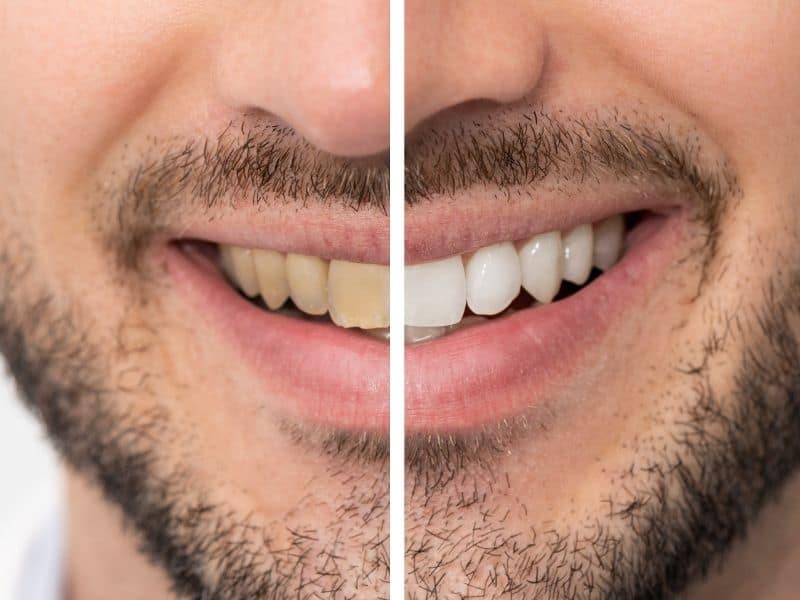
Teeth stains are natural, but they don’t have to be permanent, and with our professional teeth whitening services in Howard Beach, your teeth can go back to their natural, untarnished appearance in a single visit.
At DPI Dental, we deliver fast, safe results supervised by Dr. Paul Ilan, our experienced cosmetic dentist, so you never have to worry about sensitivity, overuse, or uneven outcomes.
What Is Dental Whitening?
Teeth have a thin surface coat called enamel, which absorbs pigments from foods, drinks, and tobacco. Over time, this can make your teeth appear yellow, dull, or patchy, which is something over-the-counter whitening strips can’t fix.
Dental bleaching is an in-office treatment that removes deep stains from your teeth’s enamel by using a clinical-grade solution that breaks down these stains effectively and safely without affecting your teeth’s sensitivity or function.
It’s not a cover-up or a veneer; it’s a treatment that alters your teeth directly, ensuring they take on a new, more pleasant shade. Teeth whitening is also a more affordable and faster way to get a whiter and healthier-looking smile.
Benefits of Professional Teeth Whitening in Howard Beach, NY

DIY whitening kits can be easily found at the pharmacy, so why should you consider coming to our office in Howard Beach for a teeth whitening procedure?
- Quick Results: Over-the-counter DIY teeth whitening products take multiple uses to produce results. With our professional dental whitening services, you can get a whiter, healthier looking, smile in a single session, all while under the close supervision of a trained dentist.
- Custom Whitening: Unlike over-the-counter DIY products, which are a one-size-fits-all solution we make plans specific to your teeth’s condition and your goals, ensuring your gums and enamel are safe while producing immediate and effective results.
- Natural Look: We aim for clean, even results that match your natural tone and leave all your teeth looking amazing.
- Long-Lasting Effects: Professional teeth bleaching services offer longer results and are more thorough than DIY whitening kits.
In our Howard Beach office, we also offer laser teeth whitening for patients seeking a faster, high-tech option.
What to Expect from DPI Dental's Teeth Whitening Process
Our founder, Paul Ilan, is known for being the best teeth whitening dentist in Howard Beach thanks to his treatment of patients and thorough teeth whitening plans, which look like this:

Step 1: Evaluation & Planning
We’ll examine your teeth and discuss your goals and what’s achievable. Not everyone needs the same treatment strength or duration, nor can everyone get the shade they want without compromising their teeth’s enamel.
At DPI Dental, we won’t push any specific treatment just for looks or to sell a service. We’ll always work hard to match your goals as closely as possible without risking your teeth.
Step 2: Application
We begin by covering your gums to keep them safe, followed by the application of a whitening gel that’s suited to your enamel. Based on the treatment plan you’ve selected, we may use a light to speed up the whitening effect.
Step 3: Monitoring & Adjustments
While you sit comfortably, we’ll monitor the process to make sure the whitening gel is working evenly and that you’re relaxed. We might adjust the timing depending on the whitening speed and your reported sensitivity, all in order to achieve the best possible results for your mouth.
Step 4: Reveal & Rinse
Once everything’s done, we’ll rinse your teeth, evaluate the results, and give you care tips to ensure you maintain your new shade as long as possible, and that’s it. One quick and effective teeth whitening service done in a single visit.
Why Choose DPI Dental for Cosmetic Whitening?

At DPI Dental, we offer affordable dental bleaching in Howard Beach in a comfortable setting, with professional supervision and real, quick results.
- Experience: Dr. Paul Ilan brings more than 20 years of hands-on experience in both cosmetic and family dentistry. He makes sure every detail is right before you leave the chair.
- Technology-Driven: From application to finish, our whitening treatments are backed by dental-grade tools that help lift stains safely and evenly across your entire smile.
- Comfort-Focused: We provide a comfortable service even for those who’ve had negative experiences at the dentist before. We’ll perform sensitivity and comfort checks during the teeth whitening procedure to make the experience a positive one.Community Trusted: We’re the cosmetic dentist Howard Beach patients return to for consistent care for a reason. We’ve been in the business for more than twenty years and have made ourselves part of the community in the process.
Your Same Smile, But Brighter
Whether you’re prepping for a big event or just want to feel more confident in your day-to-day, our dental bleaching services in Howard Beach can help you get there.
At DPI Dental we’re taking in new clients, so call us at (718) 843-3222 or schedule an appointment online and come in for a visit. You’ll walk out with a cleaner, whiter, more confident smile in no time.

FAQ's
How long does your in-office teeth whitening in Howard Beach take?
Most of our sessions take between 45 and 60 minutes, and you usually only need to come for a single session to get the results you want. You’ll see a change immediately, though the full effects will be visible within 24 hours.
Is dental bleaching safe for sensitive teeth?
Yes, it is, when done professionally. At DPI Dental, we make sure to check your teeth sensitivity beforehand and will adjust the strength of the treatment accordingly to ensure you feel little to no discomfort before, during, and after.
What makes laser teeth whitening different from DIY bleaching kits?
Laser teeth whitening uses a light-activated gel for quicker results in fewer sessions, while over-the-counter DIY whitening takes repeated use to produce any kind of change.
How affordable is professional whitening?
Very, and at DPI Dental, we not only offer affordable dental bleaching in Howard Beach, NY, with flexible scheduling and competitive pricing, but we also take most major insurances to make things easier for you.
Can I do this if I have fillings or crowns?
Yes, that’s not an obstacle, but keep in mind that whitening doesn’t affect restorations. If you want an even, seamless whitening, you’ll only be able to go as white as your fillings and crowns already look.